
FAQ
Plain-English answers to common questions about Card Pulse Beacon.
Getting Started
Card Pulse Beacon is a trading card tracking tool that helps you search cards, follow TCGplayer prices and history, manage watchlists, and create alerts. eBay tools focus on active listings and listing alerts.
Yes for most features. You can browse sets and view our public pages without signing in, but searching for cards, saving watchlists, creating alerts, and connecting notification channels like push or Discord all require an account.
Yes. Card Pulse Beacon is free to use, with no paid tiers or subscriptions. We may introduce affiliate links in the future to help support the site, but using them will not cost you extra.
Search and Filters
On very large searches, the filter sidebar is built from a sample so the page stays fast. Your full result set is still available across all pages, but some less common filter values may not appear in the sidebar until you narrow the search. If a filter seems missing, try adding more search terms or narrowing by set, category, or rarity first.
Lists
Lists work like folders for your watchlist. You give each one a name, such as Trade Binder, My Standard Deck, or For Sale, and add cards to it to keep your collection organized. A single card can belong to more than one list at the same time, so a card could appear in both For Sale and Trade Binder. Favorites work differently: the star simply marks a card as a favorite, without any naming or grouping. To add a card to a list or remove it, select the folder button on that card. To update several cards at once, use Select mode to choose the cards and then apply a list. You can create, rename, recolor, or delete a list from the Manage lists button on your watchlist. Once you have created some lists, you can also use them as a filter to show only the cards in the lists you choose.
Yes. Each account can have up to 50 lists. If you reach that number and would like a new one, please delete a list you no longer need first. Favorites are separate from lists, so marking cards as favorites does not count toward this limit.
TCGplayer
Watchlisted items are refreshed daily. Other items can update less predictably based on demand and source availability. If you want the most reliable updates and price history for a card, add it to your watchlist.
An empty chart usually means we do not have enough recorded history for that card and variant yet. Adding the card to your watchlist includes it in our daily price updates, so the first data point usually appears after the next update. Cards that are not on a watchlist can still gain history over time, but less consistently.
The 30-day trend compares the oldest and newest market-price points in the current 30-day window. If we have fewer than 30 days of history, we use the oldest available point instead. For example, if data starts on Jan 17 and the latest point is Feb 2, the trend is calculated from Jan 17 to Feb 2.
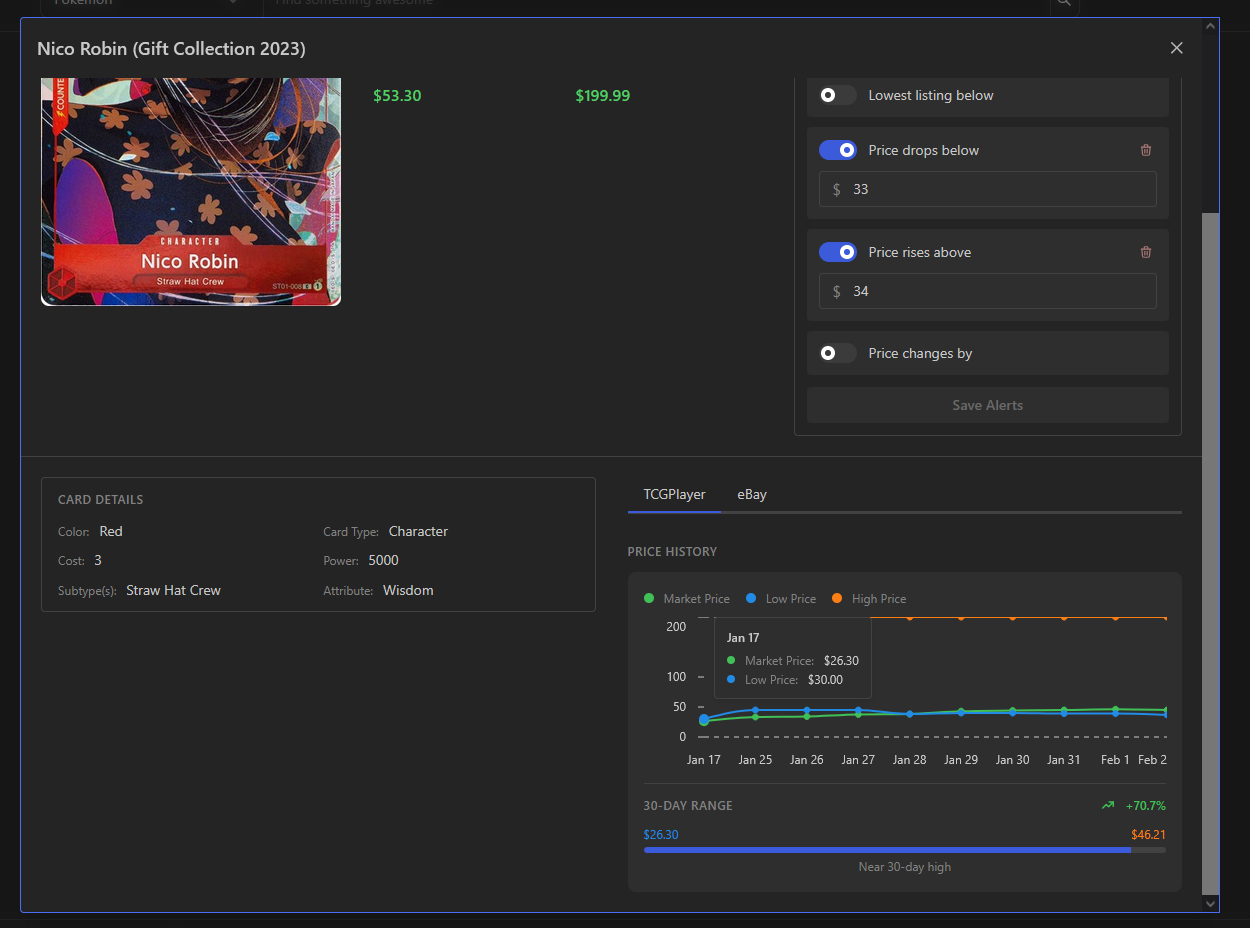
Example: the trend uses the oldest available point (Jan 17) through the latest point (Feb 2) when 30 days are not available.
TCGplayer reports the lowest listing price and the lowest shipping price separately, and those values may come from different sellers. Because of that, adding them together does not always equal the true cheapest checkout total. Card Pulse Beacon shows them separately to avoid a misleading combined price. For the exact total, open the listing on TCGplayer.
You can create alerts for TCGplayer market price drops, price increases, percent changes, and lowest price changes below a target. Alerts are scheduled, not real-time: standard TCGplayer alerts are checked once daily after watchlist pricing updates. Market price threshold alerts notify when a price crosses your target after previously not matching it, while percent-change alerts compare each day's market price with the previous day's and can notify at most once per day when that day-to-day move meets your percentage. Lowest price change alerts notify when the monitored TCGplayer lowest listing price changes while it is at or below your target; this can reflect a new low listing, seller repricing, or the previous low disappearing. These alerts can also be limited to selected card conditions such as Near Mint or Lightly Played. Every triggered alert appears in-app, and can also be sent through any extra notification channels you enable.
Alerts and Notifications
Most alerts are not real-time. Standard TCGplayer alerts are checked daily, and eBay alerts are checked hourly. Also, threshold-style alerts do not usually fire the moment you create them if the condition is already true. They are designed to notify when a price crosses your target after the alert is saved, which helps prevent instant duplicate or misleading notifications.
Use in-app notifications if you want the default, most reliable record of triggered alerts inside Card Pulse Beacon. Use push notifications if you want browser or device alerts on a personal device. Use Discord if you want alerts sent to a channel you monitor regularly or share with others.
Push notifications send browser or device alerts for your in-app notifications, but they are currently delivered as an hourly digest rather than instantly. Browser support varies: Chrome and Edge on desktop can usually notify even when the window is closed, Firefox typically requires the browser to stay open, Android works like a native app, and iOS Safari only supports push after you add the site to your home screen.
Email alerts are in limited rollout. The system already supports a daily email digest, but it is not available to all users yet. We will announce broader availability when it is ready.
Create a Discord webhook for a channel you control, paste the webhook URL into Notification Settings, and enable Discord alerts. In Discord, open the channel settings and go to Integrations > Webhooks to create one. Discord delivery goes to channels, not DMs, and is currently sent as an hourly digest rather than instantly. Keep the webhook URL private.
eBay
This alert checks live eBay listings that match your saved filters, including fixed-price, auction-format, graded, and ungraded options. For supported trading-card categories, you can also narrow matches to exact raw card conditions, specific graders, and exact grades such as Near Mint or Better or PSA 10. You get a notification when a matching listing is found at or below your target after the alert is saved. If a matching listing already exists when you create or edit the alert, the alert is saved but it does not fire immediately.
This alert watches for newly found eBay listings that match your saved filters and appear at or below your target total (item price plus shipping). On supported trading-card categories, those saved filters can include exact raw card condition, grader, and grade selections. When you create or update the alert, it records the listings that already exist so you only get notified about genuinely new matches, not older ones that were already visible.
"Matching listing total below" is best when you want a saved target for matching live listings. "New listing total below" is best when you only want listings that are newly found after your alert baseline is created. For example, if a matching listing was already at or below your target yesterday, a brand-new listing today may still trigger "New listing total below" but not "Matching listing total below."
"NEW" means the listing was posted on eBay within the last 24 hours. "NEW TO YOU" means the listing is newly found for your saved new-listings alert since that alert was created or last reset, even if the listing itself is older than 24 hours.
Yes. Each account can have up to 50 active eBay alerts at a time. If you hit the limit, deactivate or delete alerts you no longer need before creating new ones. TCGplayer price alerts do not have a cap.
eBay alerts are checked once per hour, not in real time. A new listing or price change usually notifies on the next hourly run, so delays of up to about an hour are normal.
eBay live listings are matched primarily from listing titles using the card name and set number. Sellers sometimes mislabel cards, use alternate names, bundle multiple items, or omit important details, so false matches happen. Card Pulse Beacon surfaces the best matches eBay returns, but you should still verify the photos, condition, and listing details on eBay before buying.
Support
You can email us at cardpulsebeacon@gmail.com for support, general questions, or business inquiries. Visit our Contact page for more details. For bug reports and feature requests, use the Feedback form so they are easier to track.